


.svg)
.svg)
Linux Challenges



What you’ll learn
- Linux operating system fundamentals
- Manage disk partitions and file systems
- File system navigation and management
- Handling user and group management
- Managing containers and virtual machines
- Linux permissions and access control
- Hands-on experience with real-world Linux challenges
- Linux networking concepts and commands
- Troubleshooting and debugging Linux issues
Our students work at..


Description
Check out this special challenge series to help you prepare for Linux certification exams. Head over to the Linux Challenge Series to put all of your skills to the test.
The Linux challenge series is a set of hands-on challenges designed to test your mastery of Linux concepts, and will help you get ready to obtain Linux certifications, such as the Linux Foundation Certified System Administrator certification..
These challenges will test you on a wide variety of Linux concepts, often combining several areas of study into a single challenge that reflects not only performance-based Linux exams, but also the real-world challenges that Linux administrators encounter in their daily work.
The topics may include:
- Disk partitioning and Linux filesystem management
- User and group management
- File search and manipulation
- Permissions and fundamental security concepts
- Process management
- Package management
- Service configuration (http, databases, proxy)
- Container and Virtual Machine management
- Networking, route management, and packet filtering
The interface of these challenges is divided into two parts:
1: The top half contains the Quiz portal where the details related to the challenge are displayed along with an interactive Architecture diagram.
Click on the icons and the arrow connectors in the architecture diagram and an associated task (if available) will be displayed on the Quiz portal.
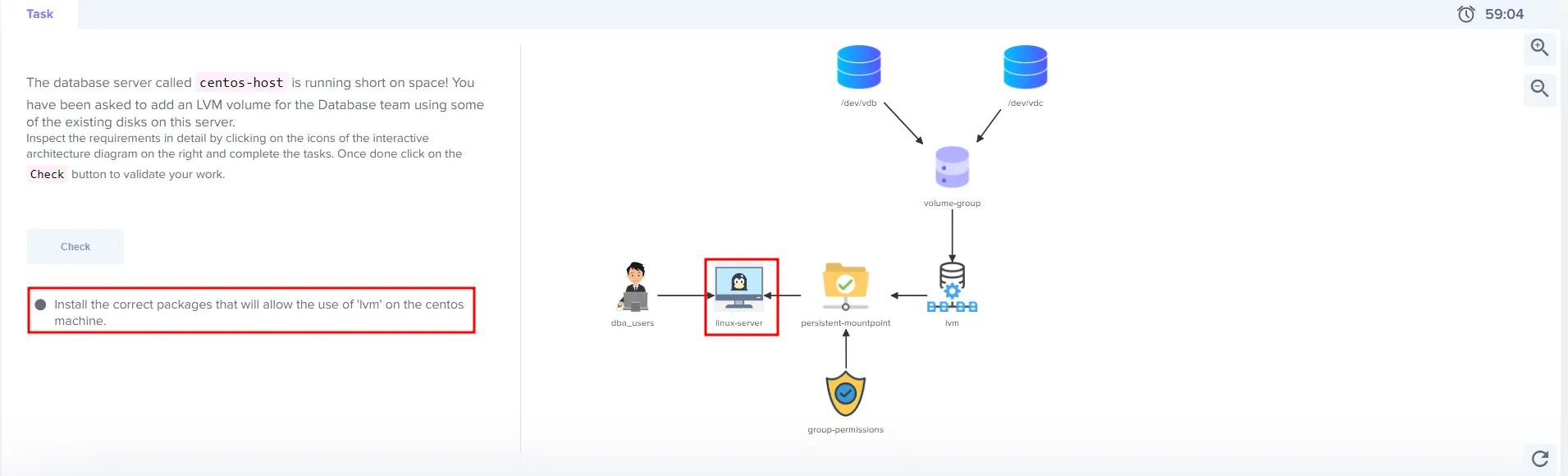
2: The bottom half of the interface contains the terminal which you will use to complete the tasks.

To validate if a task is complete, you can click on the “Check” button. If complete, the icons in the Architecture diagram will be highlighted in green. If something is yet to be completed, it will be highlighted in red.
To complete the challenge, you must complete all the tasks.
What are you waiting for? Get started with the Linux challenge series right now!
What our students say

Challenge 1

Challenge 2
Challenge 3
Challenge 4
Challenge 5
Frequently Asked Questions
Who are KodeKloud courses for?
KodeKloud courses are designed for learners at different skill levels, from beginners to experienced IT professionals looking to develop or strengthen their technical skills.
Do KodeKloud courses include hands-on practice?
Yes. Many KodeKloud courses include hands-on labs and practical exercises that let you apply what you learn in real-world environments.
Do I need any prior experience to take a KodeKloud course?
Prerequisites vary by course. Each course page provides information about the recommended knowledge or experience you may need before starting.
Can I learn at my own pace?
Yes. KodeKloud courses are designed for self paced learning, so you can learn according to your schedule and revisit lessons and practice activities as needed.
Can I access KodeKloud courses on mobile devices?
Yes. KodeKloud can be accessed through supported web browsers and mobile devices, allowing you to learn from different devices.
Do KodeKloud courses provide certificates?
Certificate availability depends on the course and your KodeKloud plan. Check the individual course page or your account for the applicable certificate details.
How long does it take to complete a KodeKloud course?
Course completion time varies depending on the course length, your prior experience, and how much time you spend on hands-on practice.
Can I practice while taking the course?
Yes. Courses that include hands-on labs allow you to practice concepts as you progress through the lessons.
How do I start learning a KodeKloud course?
Choose a course that matches your learning goals, review its requirements and curriculum, and select the available subscription option to start learning.
Get access to KodeKloud’s all courses.
Get access to KodeKloud’s all Pro courses.
Get access to our Labs now!
190+
1280+
75+


Expand Your Skills in Other Domains
AWS Certified Cloud Practitioner (CLF-C02)


.svg)


GCP Cloud Digital Leader Certification

AZ-104: Microsoft Azure Administrator

DevOps Pre-Requisite Course

Fundamentals of DevOps
DevOps Interview Preparation Course
AI Infrastructure: LLM-D, vLLM and GPUs
AI-900: Microsoft Certified Azure AI Fundamentals
AI Agents Fundamentals

Kubernetes for the Absolute Beginners – Hands-on Tutorial
Certified Kubernetes Administrator (CKA)
Certified Kubernetes Security Specialist (CKS)
AWS Solutions Architect Associate Certification

AWS Lambda

.svg)
